I have a bad habit of using my currently open tabs as a backlog of pages I intend to read, videos I intend to watch, etc. I think this is not that uncommon behavior on its own, but it becomes troublesome when you also do the same thing in private windows and suffer a crash or condition that forces you to kill the browser. The behavior of using private windows mostly comes from an avoidance of the overly “personalized” modern web. By default I don’t want some link or video I’m curious about to cause related items to be plastered on feeds unless I’ve explicitly decided that I’m interested in more content on the topic.
Hopefully you can imagine the pain felt when you have a backlog of interests you intend to catch up on when you have the time/energy that is wiped away by a browser issue. In the case where the browser process has been killed, I believe you’re likely out of luck to recover any significant content from private windows (as it should be). But the other day I had a case where firefox simply became uninteractable (it was somehow also preventing most window manager functionality, so I was mostly limited to TTY until killing firefox).
Sometimes I have recovered from similar states if there was a specific firefox process misbehaving simply by killing the process. This is generally the case if the issue is the result of some page content, as they are effectively sandboxed into one of the browser’s subprocesses. This time however the issue seemed to be some interaction between the browser and my WM (iceWM right now), and occurred when I was dragging a tab out of a window across multiple screens to another browser window. I believe this sort of interaction must be the responsibility of the base process, which if killed would have killed the whole browser.
I decided to put some effort into attempting to record my open tabs
(including private tabs) from the still present process memory. The
first step was to dump all that memory to files for
investigation. This can be done on Linux with the gcore utility,
which produces a core file, just like the automatic core dump that
Linux can generate when a process is killed. This file can be
inspected with gdb or other techniques. The command I used was this:
ps -e -o pid,command | grep firefox | grep -v grep | awk '{print $1}' | xargs gcore -a
This grabbed all running Firefox processes and created core files
named with their PIDs in the current directory. I did attempt to use
gdb to investigate these files, but without the Firefox being a
debug build I didn’t find it very helpful and resorted to more basic
methods. At the time I wasn’t sure how successful I would be, and as
an initial validation was performing basic grep commands to check
that at least some of the core files would contain substrings I knew
to be within URLs of pages I had open in private windows. I also used
the strings utility to identify promising candidates.
After finding files and addresses of interest I used hexyl <corefile> | less -R (still in the TTY) to inspect the files. hexyl is a CLI
hex viewer utility, and some investigation led to finding promising
sections like this one:
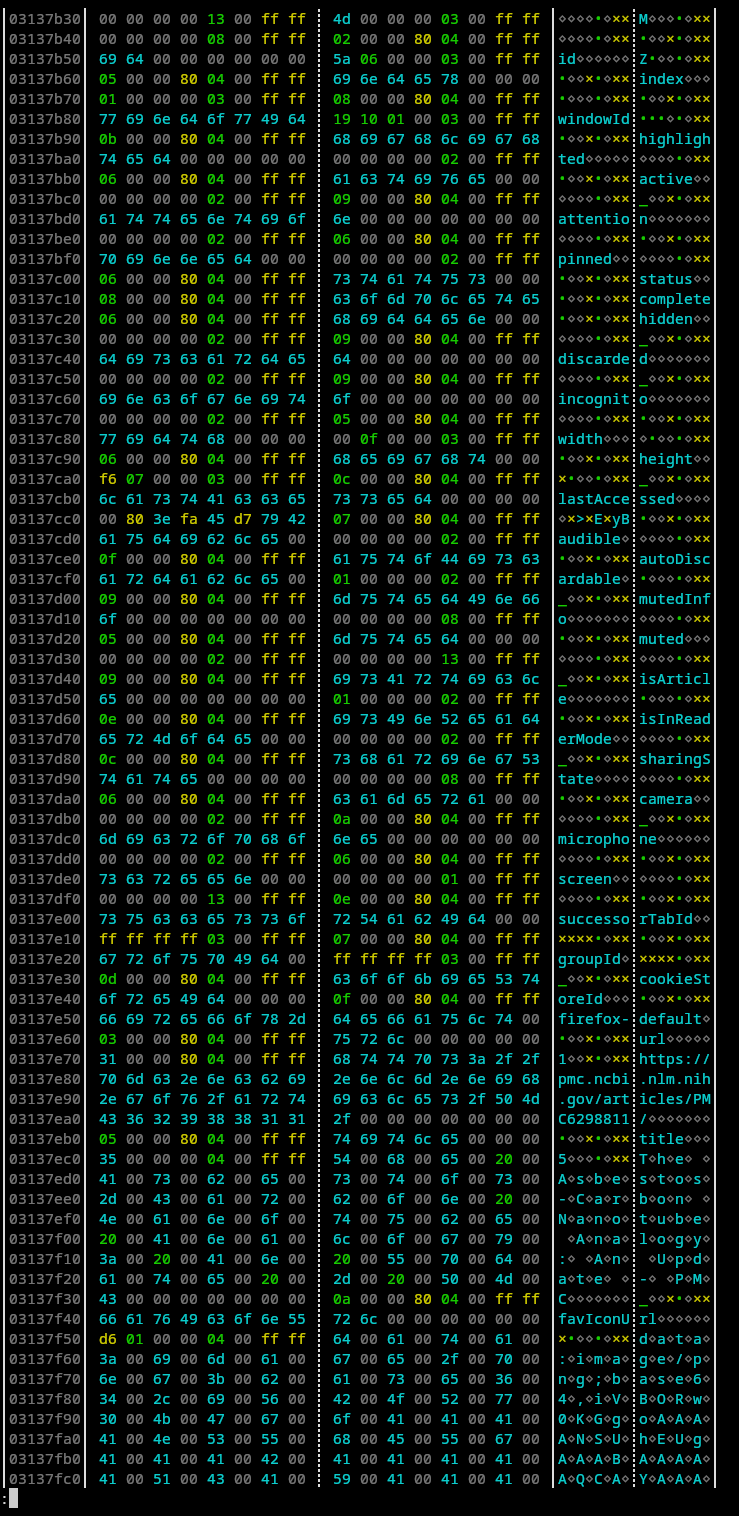
Searching the Firefox repository for the more unique strings like
favIconUrl shows that we’re probably looking at the extension tab
information
schema.
This might only exist because I have extensions that actually use that
information installed and enabled in private windows (although in
retrospect to taking the screenshot, this particular section is from a
non-private window tab because the cookieStoreId is
firefox-default rather than firefox-private). While you might be
able to manually get the URLs by searching through the core dump with
hexyl, it’s certainly not an elegant approach. But before jumping to
writing a program blindly, it’s prudent to try to understand the
format of the data we’re looking at here. The data is not simply a
JSON string, but some sort of binary JSON encoding. I need to find the
exact byte ranges for the URLs we’re looking for to extract only that
data.
I started by looking for obvious patterns, and the first thing that
stood out was how all the strings start at 8 byte boundaries. This
isn’t a big surprise given 64-bit systems, but it helps to chunk the
data to look for further patterns. From there I started by looking for
a length field for the strings, both field names and values. I found
it in the first bytes of the preceding word for each string. The last
four bytes of each preceding word was consistently 0x0400ffff, so
we’ll consider this the type tag for the stored value. Looking at the
schema and the binary allowed deducing more type tags:
| Tag | Type | Meaning of first four bytes |
|---|---|---|
| 0x0100ffff | Undefined | |
| 0x0200ffff | Boolean | 0x00000000 for False 0x01000000 for True |
| 0x0300ffff | Integer | Integer value |
| 0x0400ffff | String | Length and type (ASCII or UTF-16) |
| 0x0800ffff | Object Start | |
| 0x1300ffff | Object End |
The string field is particularly interesting because you can take the first four bytes of the preceding word as the length, except the highest bit (as in little endian integer highest value bit) as a tag for whether the string is stored as ASCII or UTF-16. This gave me enough information to be able to write a very quick C program to scan for the desired URL strings in a binary and output them without hitting large numbers of false positives.
The program simply scans through the binary file searching for the sequence of bytes indicating a 3 length ASCII string, checks that the string is “url”, checks that the following field is an ASCII string field, and if so uses the length to get and print the URL.
#include <stdio.h>
#include <stdlib.h>
#include <string.h>

int main(int argc, char** argv) {
  if (argc != 2)
    return 0;

  FILE *fptr = fopen(argv[1], "rb");

  char word[8];

  long int pos = 0;

  while (fread(word, 1, 8, fptr) == 8) {
    // 3 len str detected
    if (*((unsigned long int *) word) == 0xffff000480000003) {
      if (fread(word, 1, 8, fptr) == 8) {
        if (*((unsigned long int *) word) == 0x00000000006c7275) {
          // "url"
          if (fread(word, 1, 8, fptr) == 8) {
            unsigned int len = *((unsigned int *) word) & 0x7FFFFFFF;
            if (((unsigned int *) word)[1] == 0xFFFF0004) {
              char url[500];
              unsigned int read_len = ((len >> 3) + 1) << 3;
              if (read_len < 480) {
                if (fread(url, 1, read_len, fptr) == read_len) {
                  url[len] = 0;
                  printf("%u %u: %s\n", pos, len, url);
                  pos += read_len;
                } else {
                  break;
                }
              }
            }
            pos += 8;
          }
          else {
            break;
          }
        }
        pos+=8;
      } else {
        break;
      }
    }

    pos += 8;
  }
  fclose(fptr);
  return 0;
}
This was reasonably successful, though a few URLs were seemingly corrupted. It seems possible that the memory for the entire JSON object may be non-contiguous, leading to issues if the break is in the region we care about, but this was good enough to be mostly successful for me.
This code does not filter for whether the tab would be restored
normally via Firefox’s normal restore process (ie a normal non-private
tab). This would be possible given the existence of the
cookieStoreId field in the JSON schema. The field seems to be set to
firefox-private for private tabs and firefox-default for
others. Filtering based on this would make the code substantially more
complicated and would make any issues from memory being non-contiguous
worse unless the code was conservative in its filtering. The better
solution would likely be to use the above to generate all candidate
URLs and afterwards filter out the list of non-private tabs restored
when Firefox is restarted. I called the project here as it met my
requirements well enough.